
A weak password can undo years of careful work in a single breach. For small business owners, freelancers, developers, and anyone managing dozens of accounts, password fatigue is real. You need strong credentials for email, banking, cloud apps, client portals, project tools, and social platforms, but creating unique passwords by hand is tedious and unreliable.
That’s exactly why a password generator online has become such a practical tool. It removes guesswork, creates high-entropy passwords in seconds, and helps you avoid the common habits attackers count on, like reused phrases, predictable substitutions, and short combinations. Used well, an online password generator can dramatically improve account security without slowing down your workflow.
What is Password generator online?
A password generator online is a web-based tool that automatically creates strong, random passwords for you. Instead of thinking up your own combinations, you choose preferences such as length, symbols, numbers, uppercase letters, or memorable passphrases, and the tool generates a password instantly.
At its core, the idea is simple. Humans are not good at randomness. We tend to reuse old patterns, favorite words, dates, or familiar keyboard sequences. An online password generator avoids those habits by producing credentials that are much harder to predict or crack through brute-force attacks, dictionary attacks, or credential stuffing attempts.
For most users, the appeal is speed and convenience. You open the tool, generate a password, copy it, and use it for a new account or to replace a weak one. For professionals, the value goes deeper. A good generator supports stronger security policies, faster onboarding, and cleaner account management across teams and devices.
Why online password generators matter more than ever
The average user now manages far more digital accounts than they did a few years ago. Even a solo freelancer may have logins for invoicing, CRM software, cloud storage, video calls, design tools, analytics dashboards, and multiple client environments.
That growth creates a familiar problem. If every password must be unique and secure, you either need a reliable system or you end up taking shortcuts. Many people choose easy-to-remember variations of the same password. That feels efficient, but it creates a domino effect. If one site is compromised, attackers test the same password elsewhere.
A password generator online breaks that cycle by making strong, unique passwords easy to create at the moment you need them. Instead of relying on memory, you rely on randomness and proper storage.
Password generator vs password manager
These tools are related, but they are not the same. A password generator creates a strong password. A password manager stores and organizes those passwords so you do not have to memorize them.
In practice, they work best together. Many password managers include a built-in generator, but standalone online tools are still useful when you need a quick password on a device where you are not logged into your manager, or when you want a simple, no-friction way to create secure credentials.
Key Aspects of Password generator online
Not all password generators are equally useful. The best ones combine strong randomness, flexible options, and sensible defaults. If you are choosing a tool for personal use or recommending one within a business, it helps to understand what really matters.
Randomness is the foundation
The biggest advantage of a password generator online is randomness. Strong passwords are not just long, they are also unpredictable. A password like Summer2024! may appear complex at first glance, but it follows a pattern that attackers know well. It contains a common word, a recent year, and a common symbol.
A randomly generated password, by contrast, does not follow a recognizable pattern. That unpredictability increases what security professionals call entropy, which is a measure of how hard a password is to guess. The more entropy a password has, the more resistant it is to automated attacks.
This is where quality matters. A trustworthy generator should rely on strong browser-based randomness rather than simplistic formulas. You may not see that technology directly, but it affects the strength of every password produced.
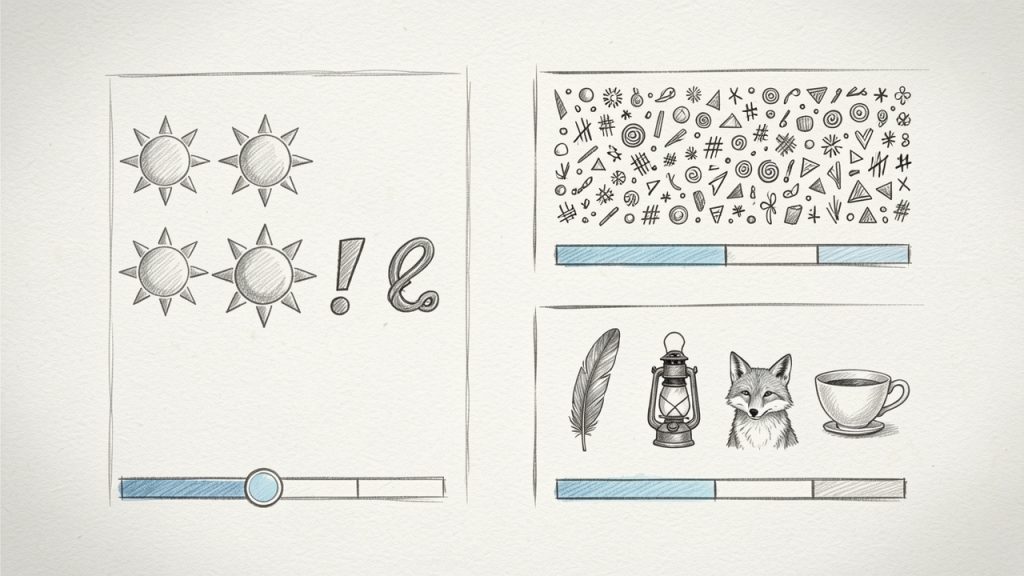
Human-created (predictable) vs Random character password vs Random passphrase, with a simple entropy/strength indicator.
Length usually matters more than complexity alone
Many people focus only on special characters. Symbols do help, but length is often the bigger factor. A short password with mixed characters can still be vulnerable. A longer password, especially one generated randomly, is dramatically harder to crack.
For many accounts, a password length of 16 to 20 characters is a strong default. For highly sensitive accounts such as email, banking, admin panels, and password managers, going longer is wise if the platform allows it.
Some generators also offer passphrases, which use multiple random words. These can be easier to type and remember when needed, while still offering strong protection if they are sufficiently long and truly random.
Customization improves usability
A useful online generator gives you control without forcing you to think too hard. You may need to include or exclude specific character types because some websites have frustrating password rules. You may also need to avoid ambiguous characters such as lowercase L, uppercase I, or zero and uppercase O.
That flexibility matters in real-world use. A password that is mathematically strong but difficult to enter correctly on mobile, or rejected by a website’s legacy requirements, creates friction. Good tools balance security with practical usability.
Here is a simple comparison of common password styles:
| Password Type | Example Style | Strength Potential | Ease of Use | Best For |
|---|---|---|---|---|
| Random character password | Mixed letters, numbers, symbols | Very high | Moderate | Most online accounts |
| Long alphanumeric password | Letters and numbers only | High | Good | Sites with symbol restrictions |
| Passphrase | Several random words | High to very high | Very good | Accounts you may need to type manually |
| Human-created password | Familiar word plus variations | Low to moderate | Good at first, poor long term | Not recommended |
Privacy and trust are essential
When people search for a password generator online, they often focus on convenience first. That is understandable, but trust should come first. You are using a security tool, so it should not create new risks.
A good online password generator should ideally generate passwords locally in your browser, rather than sending them to a server, which reduces exposure and aligns with the basic principle of minimizing data transmission. Even if the password is only visible briefly, you want as little external handling as possible.
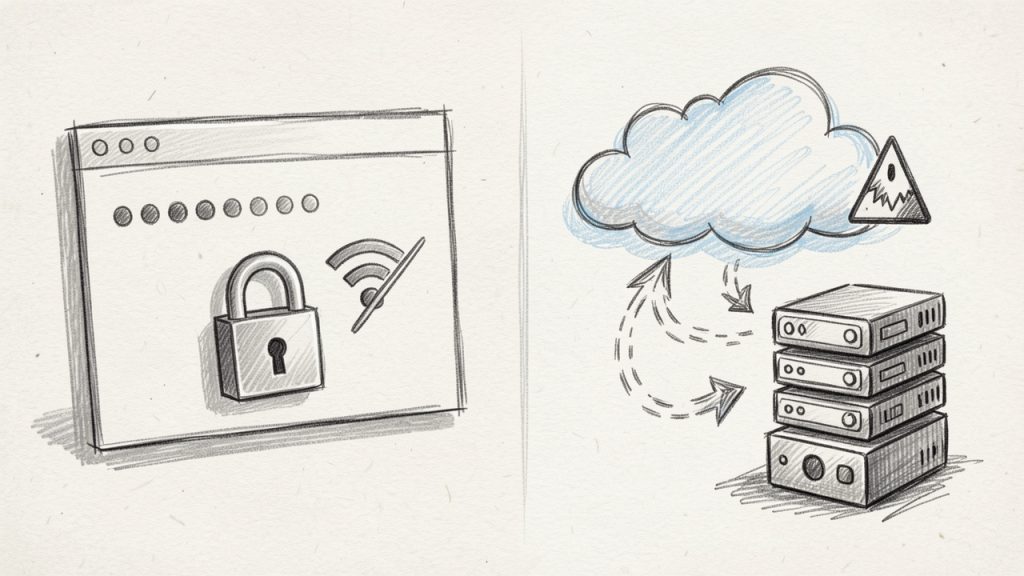
Generate locally when possible vs Avoid sending passwords to remote servers.
Transparency also helps. Reputable tools usually explain how passwords are generated, whether anything is stored, and what privacy protections are in place. If a site is vague, cluttered with suspicious ads, or pushes odd permissions, move on.
Strong passwords are only one part of security
Generating a strong password is a major step, but it is not the entire security strategy. Even the best password can be undermined if it is reused across sites, shared insecurely, or stored in a spreadsheet named “logins-final-final.”
This is especially relevant for small teams. A business may adopt stronger passwords but still struggle because credentials are copied into chat apps or shared through email. The real goal is not just stronger passwords, but stronger password practices.
That usually means combining a password generator with a password manager, enabling two-factor authentication, reviewing old accounts, and limiting access by role. Security improves most when these habits work together.
Common mistakes people still make
One of the most common mistakes is generating a strong password, then slightly modifying it for other accounts. That defeats much of the benefit. Attackers look for patterns, and small variations are easier to predict than most people realize.
Another frequent issue is prioritizing memorability over strength for every account. In reality, most passwords do not need to be memorized if they are stored in a secure password manager. Trying to remember all of them usually pushes people back toward weak, repeated patterns.
A third mistake is ignoring account importance. Not every login carries the same risk. Your email account, domain registrar, payment systems, cloud storage, and admin dashboards deserve the strongest possible credentials because they often act as gateways to everything else.
How to Get Started with Password generator online
Getting started is straightforward, but doing it well makes a noticeable difference. The goal is not simply to generate one strong password. It is to build a repeatable habit that improves your security across all accounts.
Start with your highest-risk accounts
If you have been using weak or repeated passwords, do not feel like you need to fix everything in one sitting. Start with the accounts that matter most. In most cases, that means your primary email, banking, password manager, cloud storage, and any business-critical software.
These are the accounts that can trigger broader compromise if accessed by an attacker. Securing them first gives you the highest return for your effort.
A practical first pass usually includes:
- Email account: This is often the recovery hub for everything else.
- Banking and payment tools: Financial systems need immediate attention.
- Password manager: Protect the vault before anything else.
- Business admin accounts: Hosting, domains, cloud tools, and client systems.
- Frequently reused accounts: Replace any password that appears in multiple places.
Choose sensible generator settings
When using a password generator online, pick settings that fit both security and the platform you are using. For most modern websites, a random password of 16 or more characters that includes uppercase, lowercase, numbers, and symbols is an excellent choice.
If you expect to type the password manually, a passphrase or a password without ambiguous characters may be more practical. If a site has odd restrictions, adapt the output, but avoid over-simplifying just for convenience. It is better to use a long alphanumeric password than a short one with forced complexity.
Store passwords properly from day one
This step matters just as much as generation. If you create strong passwords but save them in insecure notes, browser text files, or shared documents, you lose much of the protection.
A password manager is the best companion to an online generator. It lets you create, store, and autofill unique passwords across services without relying on memory. For teams, it also creates safer sharing workflows and better visibility into who has access to what.
If you are a freelancer or business owner, this can also improve continuity. When tools, client portals, or financial platforms are stored properly, access is less likely to get lost during device changes, contractor handoffs, or urgent support situations.
Use passphrases when they make more sense
Not every account needs a dense string of characters that looks impossible to type. Sometimes a random passphrase is the smarter choice, especially for systems you access manually on multiple devices.
A well-generated passphrase made of unrelated words can offer strong security while remaining easier to enter accurately. The key is that the words must be random, not chosen from personal preferences or familiar phrases.
For example, a random passphrase works well for Wi-Fi access, encrypted backups, or accounts that require occasional manual login. For everything else, traditional random passwords are still a strong default.
Build a simple ongoing routine
A security habit only works if it is sustainable. The easiest approach is to use a generator every time you create a new account or change an old password. Make uniqueness your default, not your exception.
It also helps to review older accounts in batches. Update a few each week rather than turning it into a one-time project you never finish. Over time, your weakest credentials get replaced without creating unnecessary friction.
If you manage a team, set a clear standard. Encourage unique generated passwords, require two-factor authentication where possible, and avoid informal credential sharing. Good security is easier to maintain when the process is consistent.
What to look for in a good online password generator
Before choosing a tool, focus on a few practical signals of quality:
| Feature | Why It Matters |
|---|---|
| Local browser generation | Reduces the chance of passwords being transmitted or logged remotely |
| Adjustable length | Lets you create stronger passwords for sensitive accounts |
| Character controls | Helps meet site requirements without weakening security |
| Passphrase option | Useful for manually entered credentials |
| Clear privacy information | Builds trust and shows security maturity |
| Clean interface | Reduces mistakes and speeds up everyday use |
Conclusion
A password generator online is one of the simplest security upgrades you can make, and one of the most effective. It helps you create strong, unique passwords quickly, reduces reliance on predictable patterns, and supports better security across personal and business accounts alike.
The next step is practical. Pick a trustworthy generator, pair it with a password manager, and start by updating your most important accounts. Once strong password creation becomes part of your normal workflow, better security stops feeling like a chore and starts feeling automatic.